
The Hybrid Chatbot Stack: When to Cache, Route, or Generate
How to build a hybrid AI system that answers questions at the right cost, speed, and quality level

Every time a user asks “What are your business hours?” and your system sends that query to GPT-4o, you’re spending roughly 17x more than you need to. At scale, this adds up fast.
This comes up constantly in conversations with PMs I mentor and in my UW classes. The pattern is almost universal: teams launch with a single LLM handling everything, watch their API bills climb, and then scramble to optimize.
This isn’t about being cheap. It’s about matching the right capability to the right task. A question about your return policy doesn’t need the same computational firepower as “Help me understand which health insurance plan makes sense given my family situation.” Treating them the same wastes money and often adds unnecessary latency.
So this post is my attempt to lay out how smart chatbot routing actually works, when to use each layer, and where I’ve seen teams get tripped up.
What You’ll Learn (12-minute read)
Why single-model chatbots burn money on simple questions
The four layers of a smart chatbot stack (and what each does)
Three types of caching, including semantic caching with embeddings
How ML classifiers can answer questions without ever calling an LLM
When to route to small vs large models
What to do when your routing isn’t confident
Metrics that actually tell you if this is working
The Sledgehammer Problem
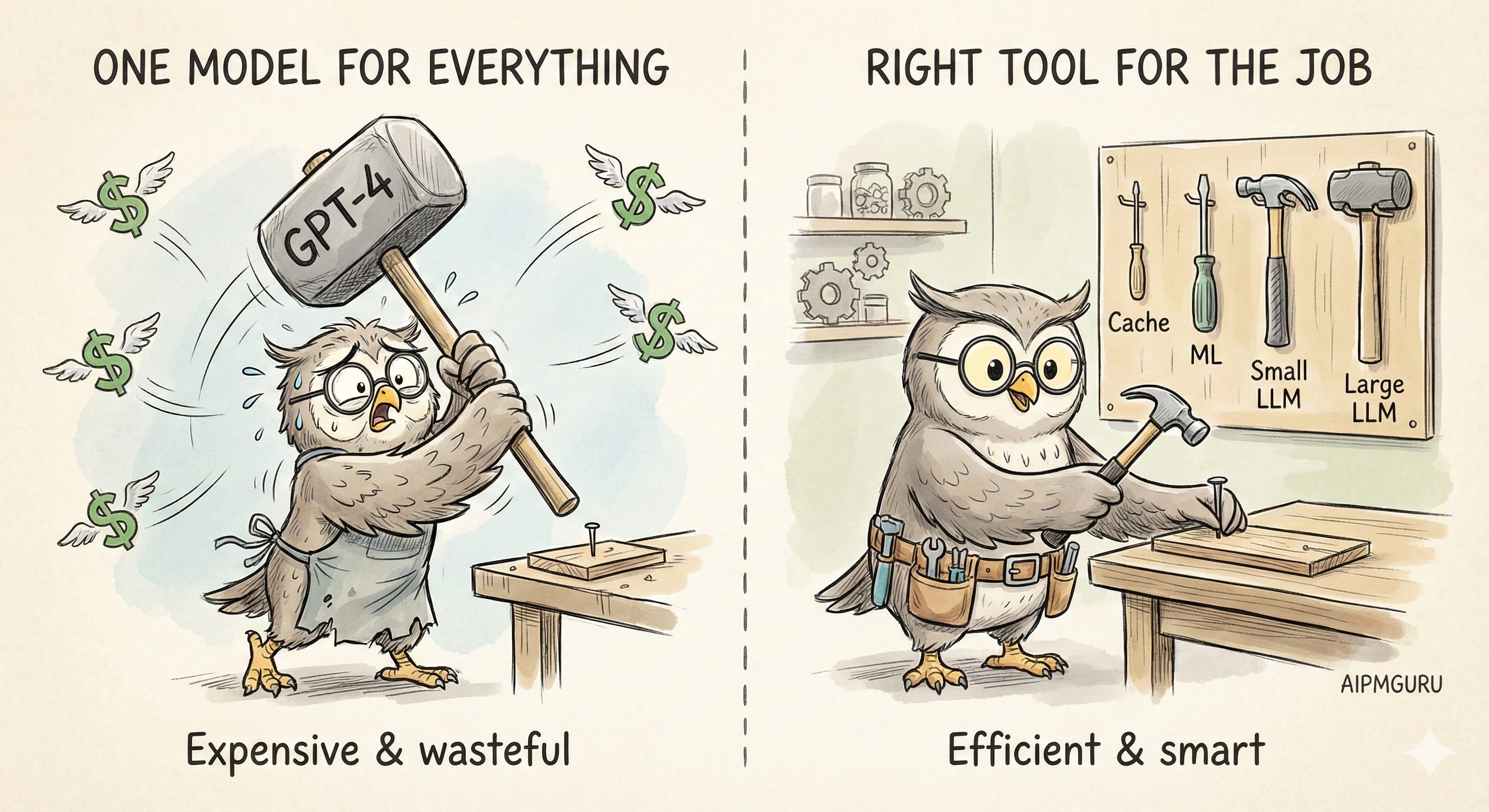
Most chatbot architectures are simple. User sends a message, it goes to the LLM, and the LLM responds. Clean. Easy to build. And often wasteful.
Here’s the thing. User queries exist on a spectrum:
“What are your hours?” is not the same as “Given my situation (remote worker, two kids, occasional travel), which plan makes the most sense for me?”
The first question has a fixed answer. It doesn’t need reasoning. It doesn’t need context. It definitely doesn’t need a model that costs $2.50 per million input tokens to process it.
But if you’re routing everything to GPT-4o, that’s exactly what you’re doing. The math gets ugly fast. A simple FAQ response might use 500 input tokens and 200 output tokens, costing roughly $0.003. Sounds tiny. At 100,000 queries per month, that’s $300 just for questions you could have answered with a cached lookup costing effectively nothing.
And GPT-4o isn’t even the expensive option. If you’re using Claude Opus 4.5 ($5/$25 per million tokens) or a reasoning model for complex tasks, the gap widens.
I wrote about this principle in “Use the Smallest Capability That Works” - the idea that every capability you add (ML, GenAI, agents) brings complexity, cost, and risk. You want the minimum capability that solves the problem well. For chatbots, that means building layers.
The Stack (High Level)
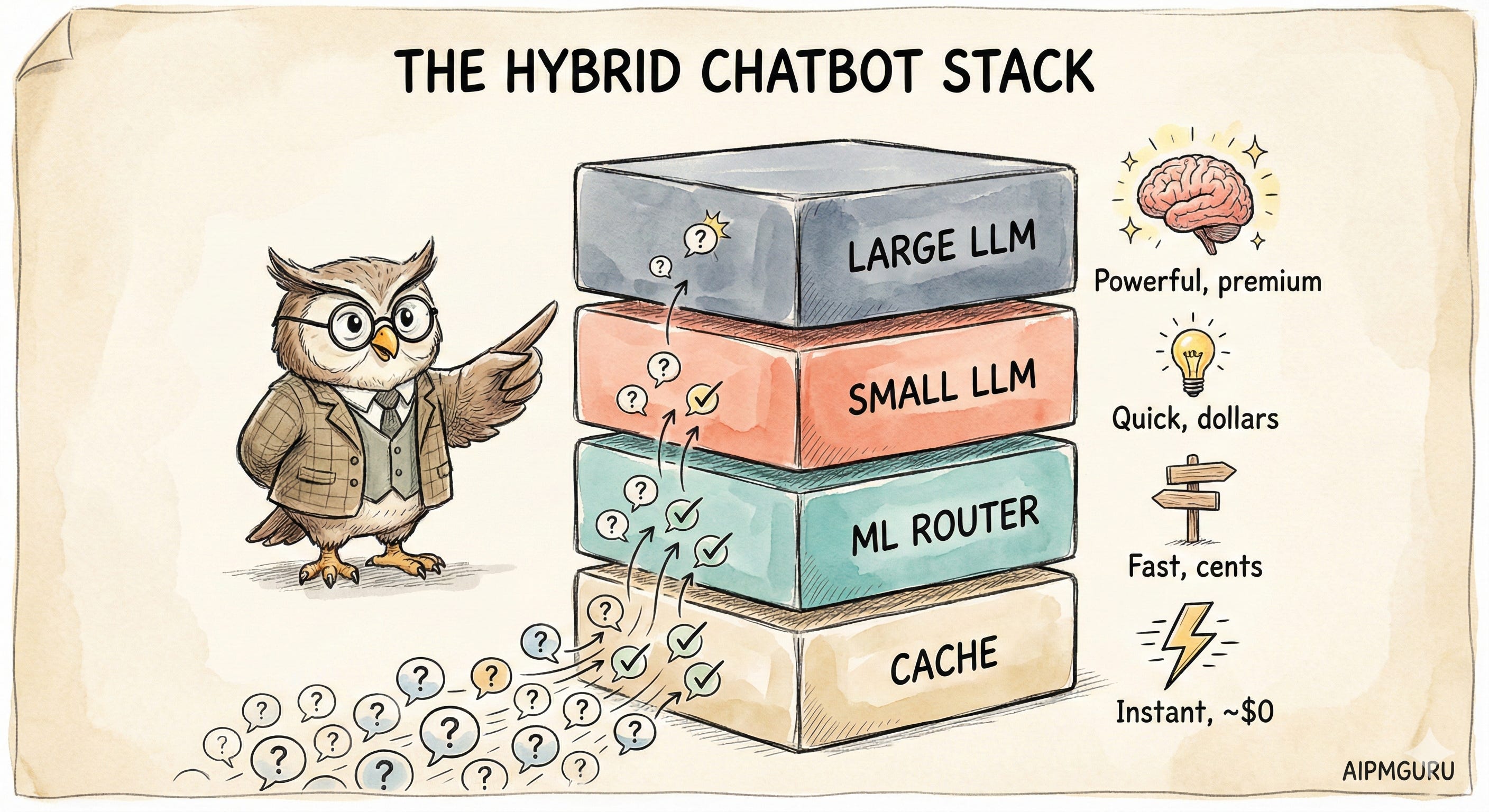
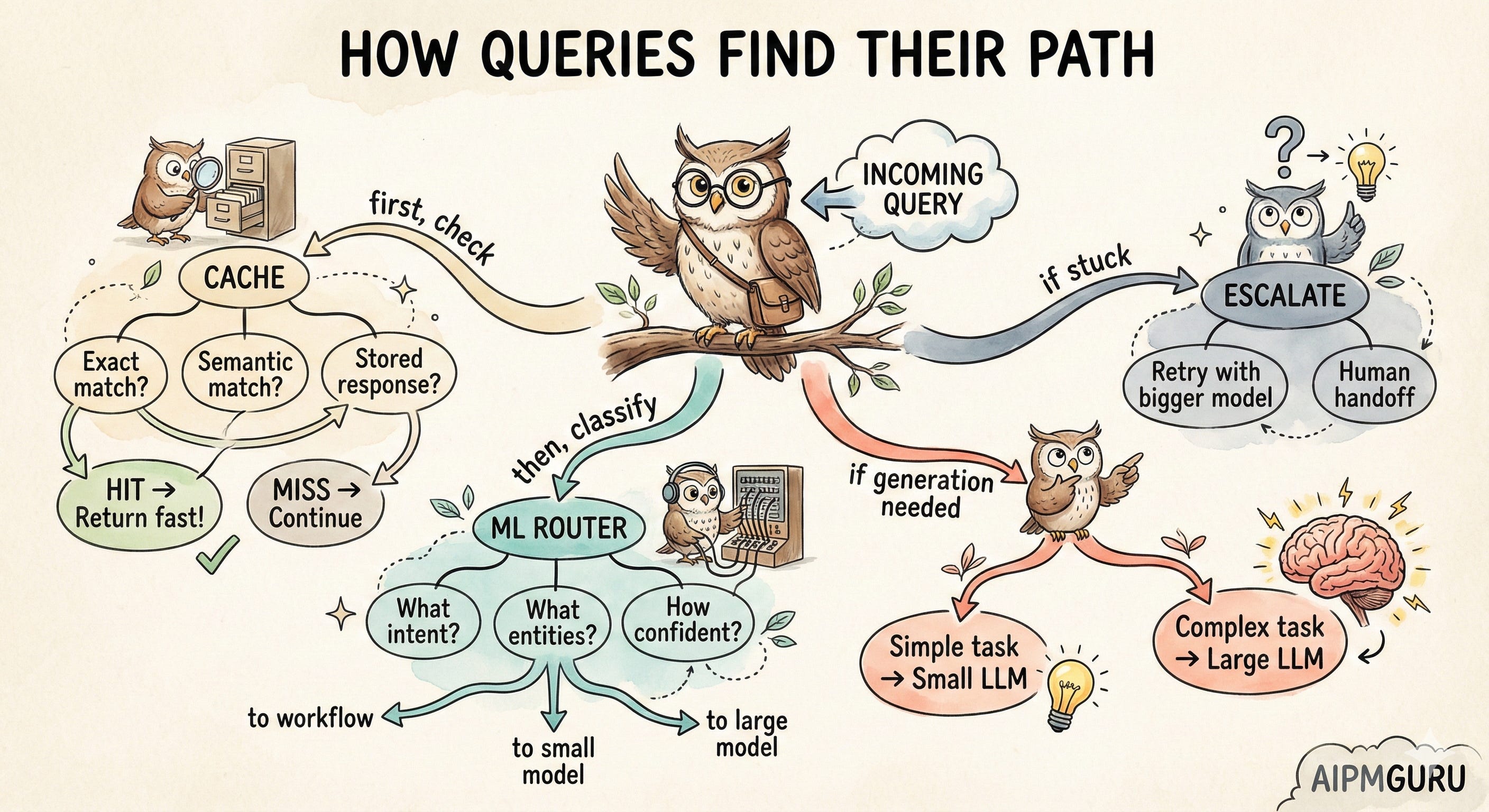
Think of a smart chatbot as a series of filters. Each layer tries to handle the query. If it can’t, it passes the query up to the next layer. Most queries should be handled by the cheaper, faster layers at the bottom.
The cache layer is nearly instant and basically free. ML classification takes maybe 100ms and costs fractions of a cent. Small LLMs are a few hundred milliseconds and a few cents. Large LLMs are seconds and real money.
The goal is to have most of your traffic handled by the bottom layers. Only the genuinely complex stuff should reach the top.
Let me walk through each layer. (I’ll include some Mermaid diagrams for those who think visually, but the concepts matter more than the flowcharts.)
Layer 1: Caching
Caching is your first line of defense against unnecessary LLM calls. There are three types, and I think most teams only implement the first one.
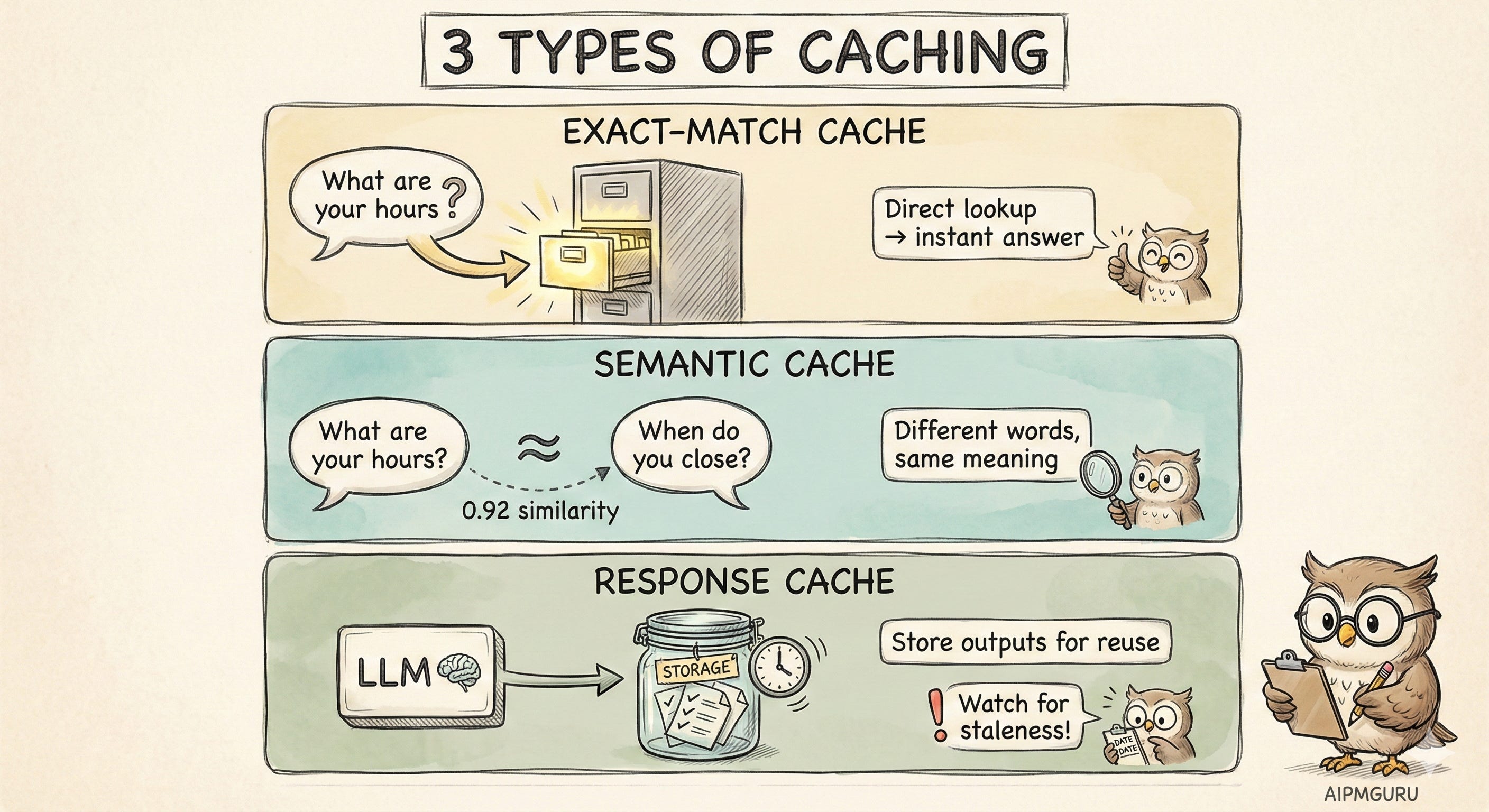
Exact-match caching is the obvious one. You keep a lookup table of known questions and their answers. “What are your hours?” maps to your hours. Simple. The problem is that it’s brittle. “What are your hours?” and “When do you close?” don’t match, even though they’re asking the same thing.
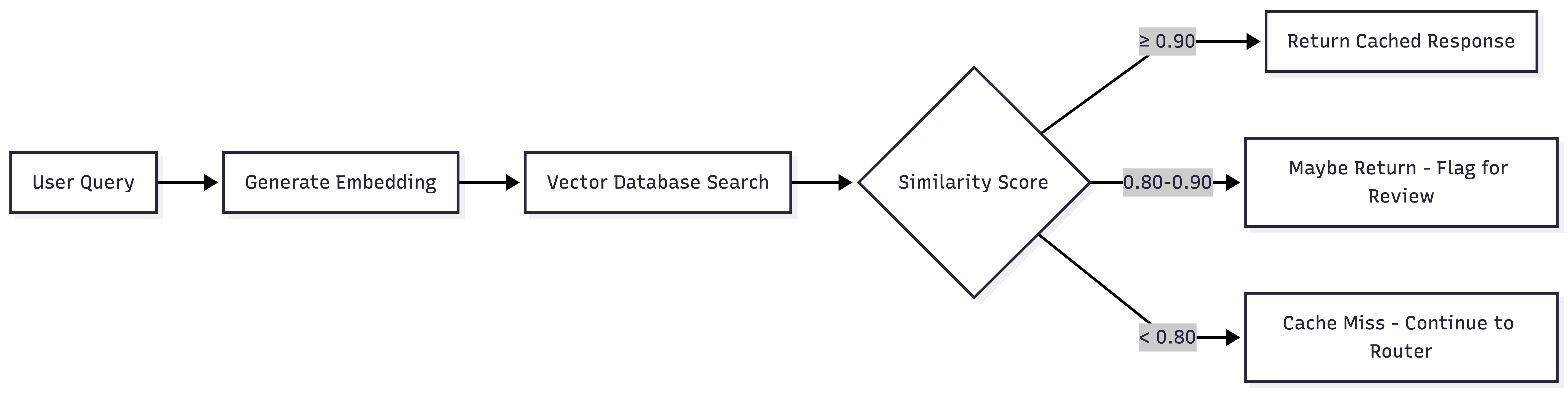
Semantic caching is where it gets interesting. Instead of matching exact strings, you match meaning. You convert queries into embeddings (numerical representations that capture semantic meaning), store them in a vector database, and find similar queries.
I covered embeddings in depth in “Vector Database 101,” but the short version: sentences with similar meanings produce similar vectors, even if the words are different. “What are your hours?” and “When do you open?” cluster together in vector space.
The tricky part is setting your similarity threshold. Values between 0.85 and 0.95 are common, but the right number depends on your use case. FAQ-style queries with stable answers can probably tolerate lower thresholds. Product recommendations or anything with real consequences? You'll want to be more conservative. Plan to tune this based on what you see in production.
Response caching is different from both of these. Here, you’re caching the outputs of LLM calls themselves. If the exact same prompt (or a very similar one) is sent to your LLM, return the cached completion. Many providers now offer this natively — Anthropic, for example, charges 0.1x for cache reads.
The gotcha with response caching is staleness. If the underlying information changes, your cached responses become wrong. Don't wait until a customer complains about outdated information; build your cache invalidation strategy from the start.
What's a good cache hit rate? For mature systems with well-understood user queries, 30-50% is a reasonable benchmark. Higher isn't always better: it could mean you're not serving enough novel user needs, or your product scope is narrower than you think.
Layer 2: The ML Router
It's tempting to skip straight from "cache miss" to "call the LLM." But there's a powerful intermediate step most teams underutilize: traditional machine learning for classification, extraction, and routing.
I wrote about this in “When to Use Generative AI vs. NLP.” The punchline is that many tasks that feel like they need GenAI can actually be handled by cheaper, faster ML models.
If the task has a structured output and you have training data, ML is probably better.
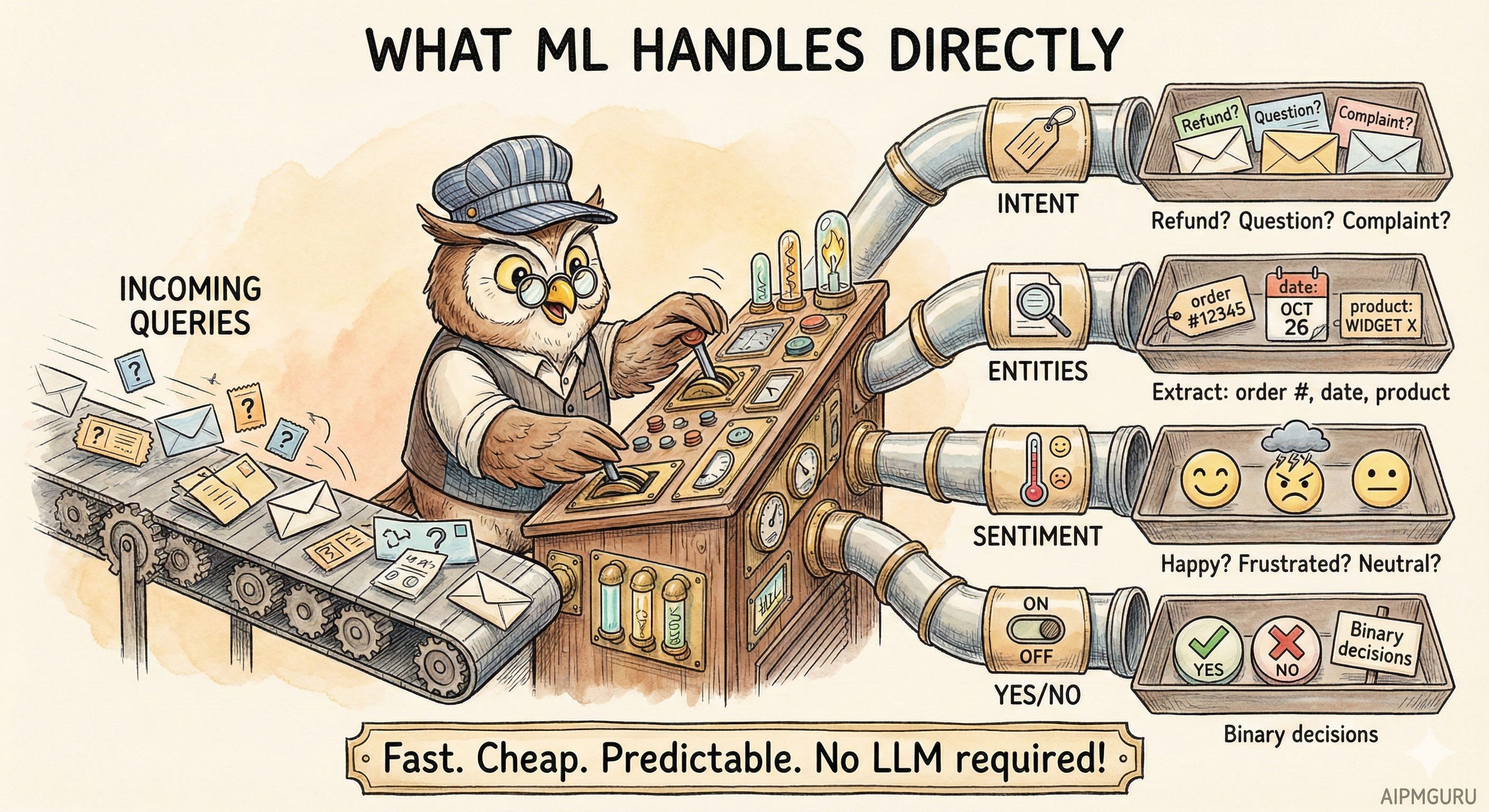
Think about what ML can do directly, without any LLM:
Intent classification. 'Is this a refund request, a product question, a complaint, or something else?' Lightweight classifiers, BERT-based models, or even simpler approaches such as logistic regression can achieve 95%+ accuracy in milliseconds. These models are trained to categorize, not generate. You don't need GPT-4 to figure out that 'I want my money back' is a refund request.
Entity extraction. “What’s the order number? What product? What date?” Named Entity Recognition models are really good at this. “I bought the blue running shoes on January 5th and want to return them” becomes {product: “blue running shoes”, date: “January 5”, intent: “return”}.
Sentiment detection. “Is this user frustrated?” Useful for prioritization. A frustrated user might be routed to a human more quickly.
Binary decisions. “Does this need human escalation? Yes/No.” These are classification problems. ML handles them well.
So ML becomes your router. It doesn’t answer the question; it figures out what kind of question it is and where to send it. Sometimes the answer is “this can be handled by a workflow without any LLM.” Sometimes it’s “route to the small model.” Sometimes it’s “this is complex, send it to the big model.”
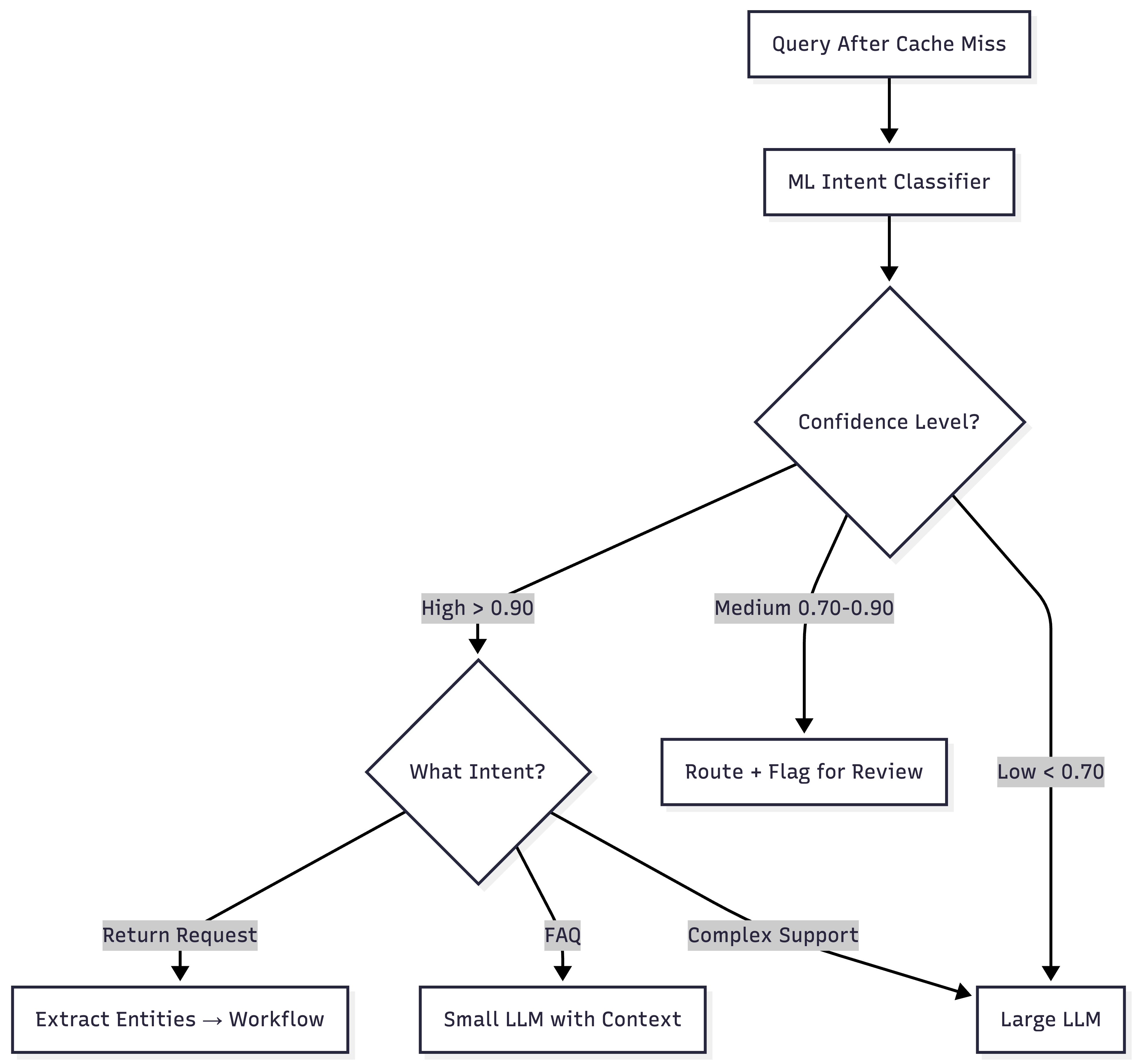
The key is that your classifier should output confidence scores, not just labels.
Above 0.90 confidence: route automatically based on the classified intent
Between 0.70 and 0.90: route, but maybe flag for review or add hedging
Below 0.70: don’t trust the classification, escalate to a more capable model
Don't treat classification as binary; it worked or it didn't. Confidence gives you a gradient. A query classified as "refund request" with 0.95 confidence should be handled differently than one classified with 0.72 confidence.
Layer 3 & 4: Model Tiering
Now we’re past cache and past ML routing. The query needs generative capability. But which model?
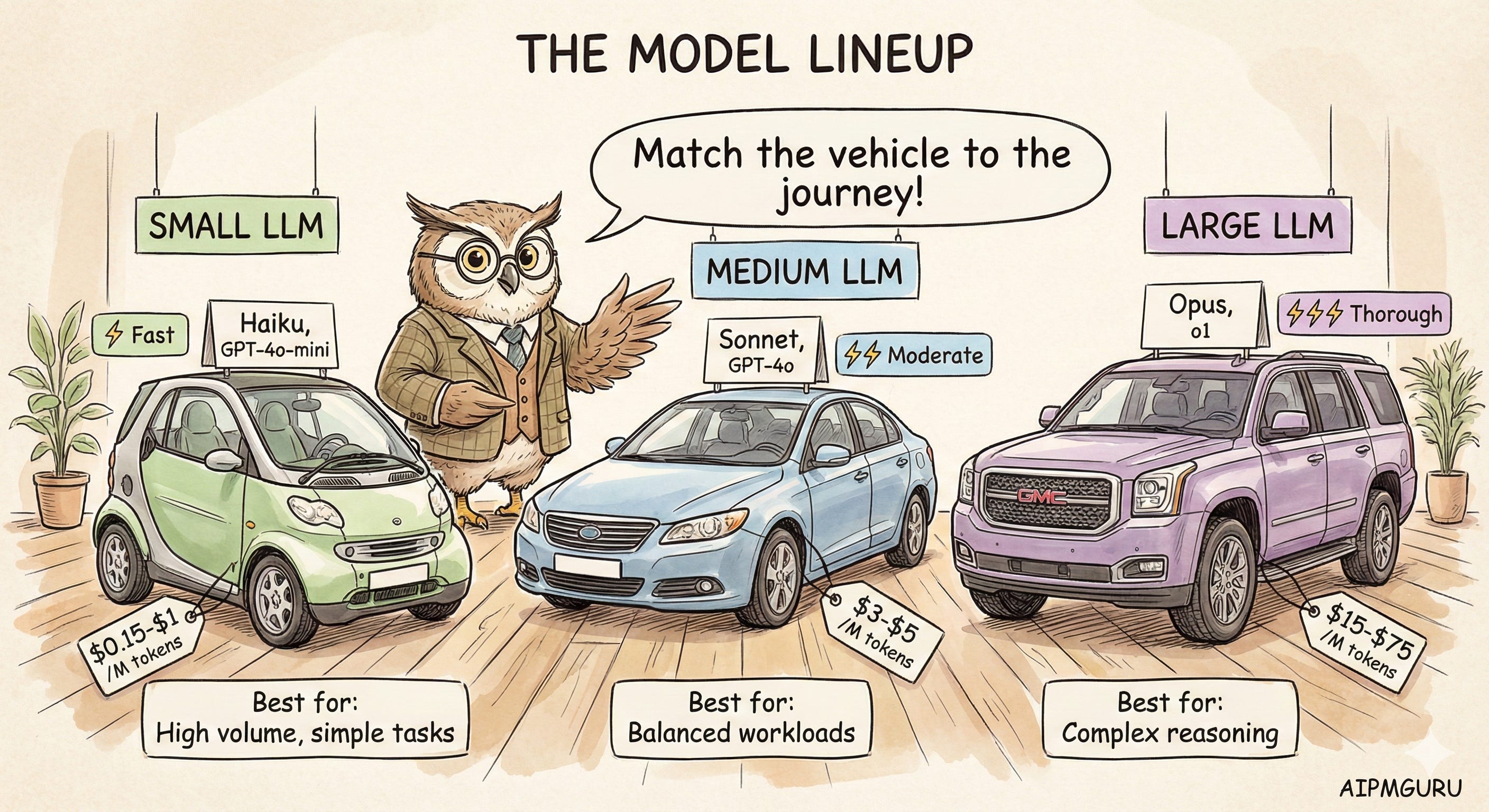
Model providers offer tiers for a reason. GPT-4o-mini costs $0.15 per million input tokens. GPT-4o costs $2.50, which is roughly 17x more. Claude Haiku is $1/$5 (input/output per million) while Claude Opus 4.5 is $5/$25.
For many queries, the small model produces responses indistinguishable from those of the large model. That’s money you can save.
When I think about which tier to use, I consider:
Query complexity. Is this a simple fact lookup or a multi-step reasoning task? Simple stuff goes to the small model.
Required accuracy. Is “pretty good” acceptable, or does this need to be exactly right? If a wrong answer is just mildly annoying, small model. If it’s a problem, go with the bigger model.
Latency requirements. Is the user waiting for a real-time response? Small models are faster.
Stakes. What’s the cost of a wrong answer? Customer support questions vs. medical advice are very different.
The pattern that makes sense to me: default to the small model, escalate to large when complexity or confidence warrants it. Starting with your largest model and optimizing later is backwards; you'll spend months unwinding costs baked in from day one.
How This Plays Out in Practice
Let me make this concrete with a few scenarios.
Scenario A: “What are your business hours?”
The cache layer finds an exact match. Returns the cached response immediately. Cost: ~$0. Latency: under 50ms. This is the ideal case.
Scenario B: “I want to return the shoes I bought last week.”
Cache layer: no match. ML classifier detects “return” intent with 0.94 confidence, extracts {product: “shoes”, timeframe: “last week”}. Router sends this to the returns workflow (not an LLM). The workflow checks return policy, looks up recent shoe orders, and generates a response from templates.
No LLM was called. Cost: minimal. Latency: maybe 100ms.
This is the power of not defaulting to GenAI. The ML classifier understood the intent, the entity extractor pulled out the details, and the workflow handled the rest.
Scenario C: “What’s the difference between Pro and Business plans?”
Semantic cache finds a similar question was asked before (similarity 0.91). Returns the cached response. Cost: basically zero, just the embedding lookup.
Scenario D: “Given my situation, I work remotely, have two kids, and travel occasionally for conferences. Which plan would make the most sense for me?”
Cache: no match (too personalized). ML classifier: detects “plan recommendation” intent but with only 0.78 confidence, and flags it as complex. The router sends it to the large LLM with RAG context about the plans.
The large model synthesizes the user’s specific situation against plan features and generates a personalized recommendation. Cost: maybe $0.01-0.03. Latency: 2-3 seconds.
This is where you want the large model. The query requires synthesis, personalization, and reasoning. A small model would give a generic answer.
When Routing Fails
No routing system is perfect. You need graceful degradation.
The simplest pattern: when your classifier isn’t confident, escalate. When your small LLM gives a weak response (suspiciously short or “I’m not sure”), retry with the larger model. When the user pushes back (”That didn’t help”), escalate.
Some signals should route straight to humans, not just bigger models:
Explicit request (”I want to talk to a person”)
Detected frustration (sentiment analysis can catch this)
Repeated failures (user has asked similar questions multiple times without resolution)
High-stakes topics (billing disputes, complaints, anything with legal implications)
The goal isn’t to avoid humans entirely. It’s about using humans where they add the most value in complex, emotional, or high-stakes situations, and letting automation handle the routine.
Metrics That Matter
How do you know if your routing is working?
Cost per query is the north star. Track it overall and by query type. If it’s dropping while quality stays stable, you’re winning.
Cache hit rate. For mature systems, 30-50% seems like a reasonable target. Track exact-match vs semantic separately so you know which is pulling weight.
Classifier accuracy. Periodically sample and manually review. Is intent detection actually correct? If most queries fall into low-confidence buckets, your classifier needs more training data.
Tier distribution. What percentage of queries go to each layer? If 90% of the traffic hits the large LLM, your routing isn’t doing much.
Quality by tier. Are small LLM responses as good as large LLM responses for the queries you’re routing there? Segment your CSAT or thumbs-up/down data by how the query was handled.
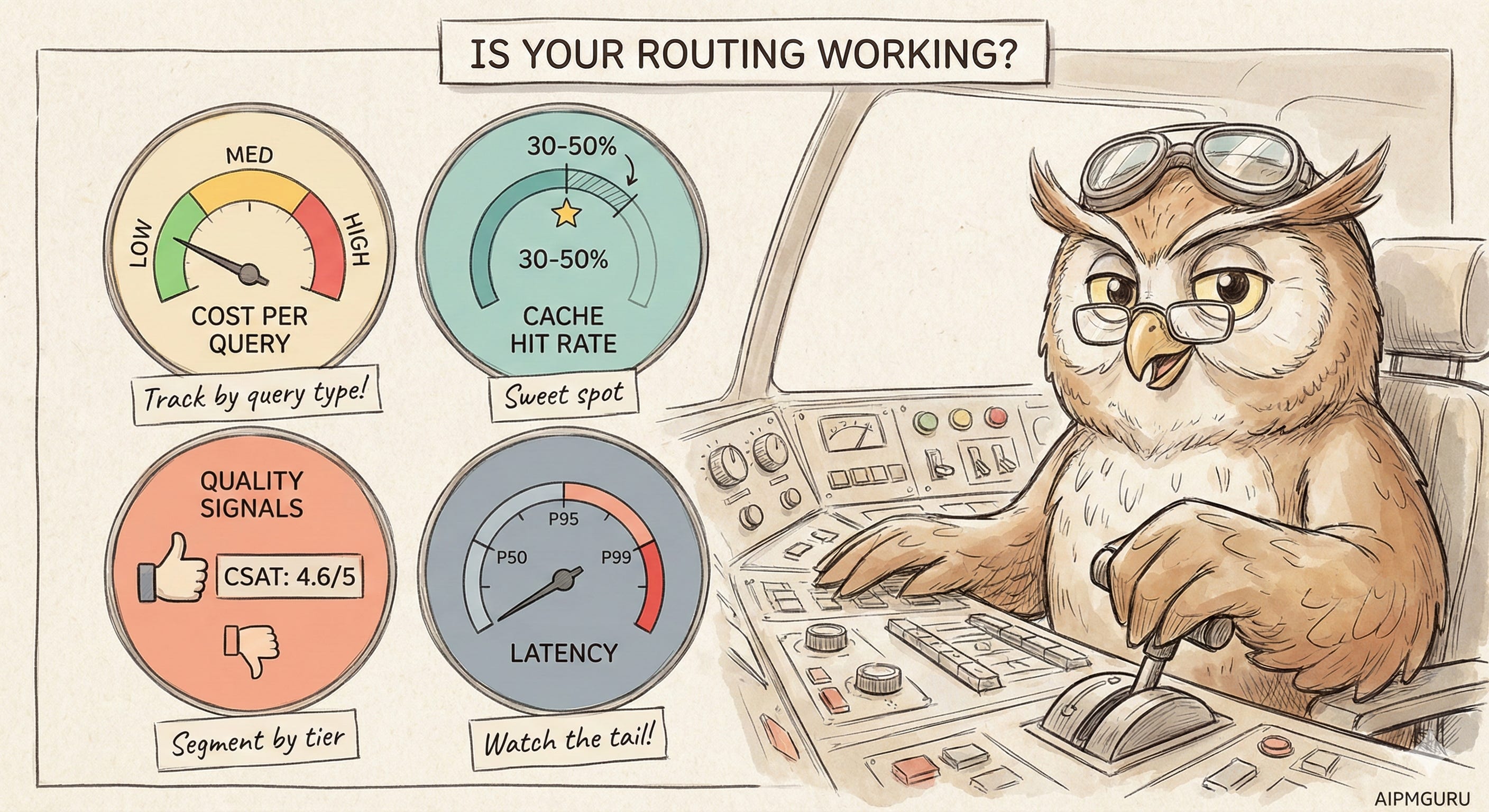
The dashboard I’d want: query volume by route, cost by route, and quality by route. Side by side. That lets you spot problems (small LLM getting poor ratings) and opportunities (frequently asked questions not yet cached).
Getting Started
If you’re building this from scratch, here’s roughly how I’d prioritize:
Start with caching. Identify your top 50 most common queries, write canonical answers, and implement exact-match caching. You’ll probably handle 20-30% of traffic immediately. This is the biggest bang for the buck.
Add semantic caching. Use embeddings to catch variations of those common queries. Another 10-20% coverage, maybe.
Build intent classification. You need labeled data for this; spend time categorizing a few thousand queries by intent. A fine-tuned classifier can be surprisingly accurate.
Implement model tiering. Start simple: two tiers. Route based on classifier confidence and a few explicit rules. Refine from there.
Instrument everything. You can’t optimize what you don’t measure. Log every routing decision, every model call, every cost.
Your routing rules will evolve. Queries you thought needed large models might work just as well with small ones. New query patterns will emerge. This is iterative work.
The Bottom Line
This whole approach comes back to a simple idea: use the smallest capability that works.
A cached response is smaller than an ML classification. An ML classification is smaller than a small LLM call. A small LLM is smaller than a large one.
Smart routing isn’t about having the fanciest model. It’s about matching the right tool to the right task, every time. The result is a system that’s faster, cheaper, and often more reliable than just throwing everything at GPT-4.
Your users don’t care how you answered their question. They care that they got a good answer quickly. Build your stack accordingly.
Have you implemented hybrid routing in your chatbot? I’d be curious to hear which patterns worked (or didn’t). Drop a comment below.
ybrid chatbot stacks are where the future of real‑world AI utility lives …context, tools, and logic all working together.